Time Box Guide: Boost Your Team’s Efficiency
A time box is a fixed period a team agrees in advance and does not extend. The work moves; the date does not.
Most teams do not miss dates because they are slow. They miss them because nothing forces the scope conversation until it is too late to have it. A time box forces it early, every time. That is the whole mechanism.
What the guide gives you
How to size a time box, what to agree before it starts, and how to run the inspect-and-adapt loop at the end without it becoming a status meeting. An Excel template comes with it, so the first cycle can start this week.
Who it is for
Team leads, delivery managers and Scrum Masters running their first few cycles, and anyone whose retrospectives keep producing the same three actions.
What happens when a time box slips?
It does not slip. The box ends on the date agreed, and unfinished work goes back to the top of the next one where everyone can see it. Extending the box to finish the work hides the one thing you most need to look at: the plan was wrong, and now you know by how much.
I have run this pattern across pharmaceutical, FMCG and public-sector programmes for over twenty years. The time box is the oldest idea in agile delivery and still the most often mishandled — usually by people who kept the ceremony and quietly dropped the fixed date. The Scrum Guide is deliberate about this; most implementations are not.
A time box only forces the scope conversation. It does not, on its own, close the loop. That happens in a proper retrospective at the end of each cycle, where the plan meets what actually happened.
Excel template to get you started
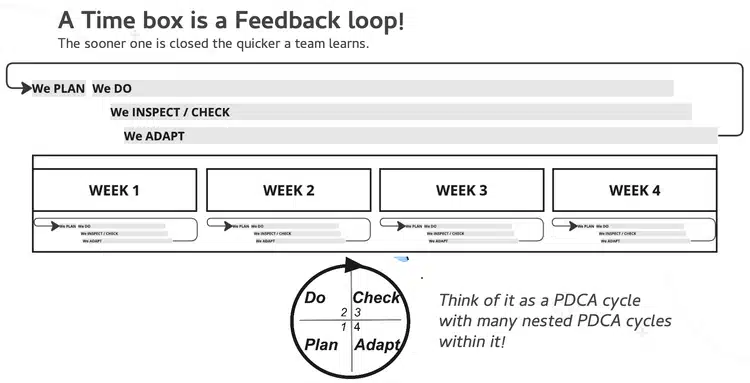
A time box needs a plan to start it and a review to close it. For the start, see Facilitating Time Box Planning. To agree how the team behaves inside the box, use Team Agreements. To see the work moving, put it on a board: Visualising Work.
Time box questions
What is a time box?
A fixed period a team agrees in advance and does not extend. The work moves; the date does not.
What happens when a time box slips?
It does not slip. The box ends on the date agreed, and unfinished work goes back to the top of the next one where everyone can see it.
Who is the guide for?
Team leads, delivery managers and Scrum Masters running their first few cycles, and anyone whose retrospectives keep producing the same three actions.
Is there a template?
Yes. An Excel template comes with the guide, so the first cycle can start this week.
If you would like to try this with your own team in a live session, see my agile transformation workshops.
