A Product Owner’s Guide to Writing Acceptance Criteria for User Stories
‘I want to create a practical guide for product owners to facilitate them in writing acceptance criteria for user stories so that their output is of value to the scrum team’
“I want a login page to authenticate users on the site.”
That was the whole requirement. One line from a product owner, early in discovery. By the time we had finished talking, it was an epic.
You’ll find page after page explaining what acceptance criteria are and what a good set should include. This post is not another one of those. It is a method a product owner can actually follow: seven steps in order, then that login page walked through every one of them.
What are acceptance criteria for user stories?
Acceptance criteria are the pass or fail statements that decide whether a user story is done. Each one says what the user must be able to do, in plain words, and leaves the how to the team. Every statement is met, or the story is not accepted. (If you are new to user stories, start here first.)
There is no partial acceptance.
Who should write the acceptance criteria?
The product owner. They are the person who will accept the story, or not, so they define what acceptance looks like. The Scrum team can facilitate. The responsibility stays with the product owner.
That cuts both ways. The criteria must also be acceptable to the team, and if they are not, they are not fit for purpose. Writing them is the product owner’s job. Agreeing them is a team activity.
Collaboration, not a hand-off.
Why Gherkin isn’t the right tool for product owners
You’ll also find post after post telling product owners to write acceptance criteria in Gherkin‘s Given, When, Then. In my opinion that is not practical, for two reasons.
First, not many product owners know Gherkin, and the team is far better placed to translate plain statements into it. That translation has real value: the team has to analyse the criteria to turn them into test scripts. And the product owner works much faster defining fitness for purpose in natural language.
Second, insisting on any scripted format is prescriptive, and that goes against an agile approach built on practicality and common sense. Don’t assume your product owner can script.
The format isn’t the problem. Who holds the pen is.
Which acceptance criteria format should a product owner use?
Plain pass or fail statements, one per line. If your team writes scenarios in Gherkin, let them translate. Your job is the what. Theirs is the how.
When do acceptance criteria need to be in place?
Before the story is ready. Acceptance criteria are part of your Definition of Ready (DoR): a story without them is not ready for technical decomposition or estimation.
No acceptance criteria, no “ready”.
How to write acceptance criteria for user stories: seven steps
Work through these in order. Each one feeds the next.
- Write down the want in the product owner’s own words. One sentence, unpolished. Resist turning it into a solution. The team is not looking for one from you.
- Sketch it. A wireframe, a screen grab, a drawing on a napkin. A picture shows scope that a sentence hides. If the story displays data, sketch the columns and how you would sort them. If it captures data, sketch the fields.
- Draft the statements. One per line, from the end user’s point of view: “I can”, “I see”. Cover the function, the exceptions (what happens when it goes wrong) and the non-functional needs. Is the data sensitive? Does it need to be real-time? How fast must it respond? For a form, say what each field accepts, what it rejects and the validation rules.
- Test every statement. Could a tester read it and answer yes or no? “An appropriate error message” fails that test. “I see a message telling me my details are incorrect” passes. Rewrite anything that can’t be passed or failed.
- Strip out the how. For each statement, ask: is this an outcome or a solution? “The site is protected from bots” is an outcome. “I see a CAPTCHA” is a solution, and the team may have a better one.
- Split anything bigger than the story. If a statement needs its own screen, journey or business rules, it is another user story. Write it down and move it to the backlog. The door belongs to this story. The room behind it does not.
- Agree it with the team, then mark it ready. Walk the team and an end-user representative through the criteria. Conversation is the critical component. Once everyone can test it, it meets your Definition of Ready.
A tale from the trench: the login page, step by step
Step 1: the want. Our product owner’s requirement, early in discovery, was: “I want a login page to authenticate users on the site.” So our user story was a simple one: “As a user I want to sign in to the site from a login page so that users can be authenticated.”
Step 3: the first draft. Then we began the deep-dive conversation: so what are your acceptance criteria? This is what we got:
- From any page, be able to access the login page via a sign-in link.
- When I click the ‘sign-in’ link, I am re-directed to the login page where I can enter my email and password for authentication.
- Upon successful login, I am re-directed to the homepage.
- On the homepage, my first name is displayed in the upper right-hand corner, along with the date and time of my last login.
- I should be able to retry authenticating myself three times before I am locked out of my account and must reset my password to unlock it.
- My password needs to follow the company password policy for secure passwords.
- I must also see a link which allows me to re-set my password.
- I must also see a link which allows me to register if I am a new user.
Notice we went straight from step 1 to step 3. Skipping the sketch is the most common shortcut, and you can already see what it cost: a site-wide link, a personalised homepage, password resets and registration had all crept into a sign-in story.
Step 2: the sketch, late. Having seen the scope balloon, we asked our product owner to sketch a wireframe. We were convinced more would emerge. It did.
The wireframe that revealed the hidden scope
The wireframe sketched out by our product owner.
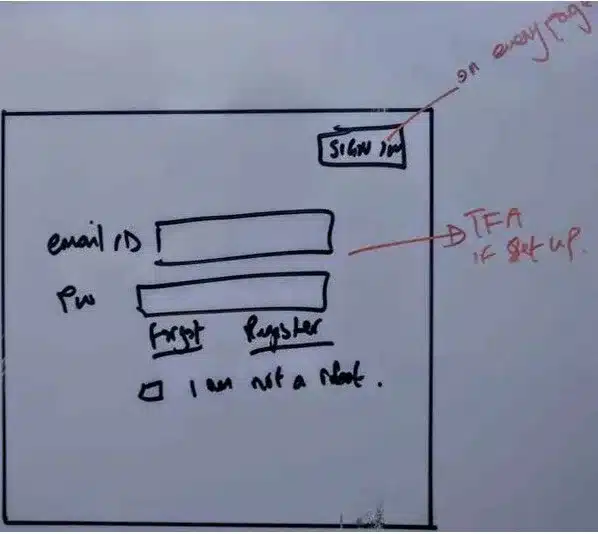
The sketch confirmed what the first draft had already slipped in (a sign-in button marked “on every page”, links to reset a password and to register) and added two more. An “I am not a robot” checkbox. And, in red pen beside the email field, “TFA if set up”: two-factor authentication, for anyone who has switched it on.
Order matters.
Steps 4 to 6: test, strip, split. Run the first draft through the next three steps, one line at a time, and this is what falls out:
- The site-wide sign-in link is a navigation change across every page. Split.
- The first name and last login on the homepage is a homepage feature. Split.
- The password policy is checked when a password is set, not when someone signs in. It belongs to registration and password reset. Split.
- The links to reset a password and to register stay. The door belongs to this story. The reset and registration journeys do not.
- Nothing says what happens when someone gets their details wrong. Add it, and write it so a tester can pass or fail it.
Step 7: agree it. The conversation with our product owner and the team identified the additional user stories we needed, and kept the criteria for the original story tied to that story alone.
The revised user story and its acceptance criteria
The user story: “As a registered user, I want to sign in with my email address and password so that I can read members-only premium articles.”
Notice the story changed too. The original’s “so that” was the site’s goal, not the user’s, and it named the solution: a login page. The want is the same. Who benefits has moved.
Its acceptance criteria:
- On the sign-in page I can enter my email address and password and submit them.
- With a correct email address and password, I am signed in and taken to the homepage.
- With an incorrect email address or password, I stay on the sign-in page and see a message telling me my details are incorrect.
- After three failed attempts, my account is locked and I can only unlock it by resetting my password.
- I can see a link to reset my password.
- I can see a link to register as a new user.
Six statements. Each one passes or fails.
The stories it split into:
| New user story | Where it came from |
|---|---|
| Sign-in link on every page | First draft, criterion 1 |
| Homepage greeting with first name and last login | First draft, criterion 4 |
| Password reset, including the password policy | First draft, criteria 6 and 7 |
| New user registration, including the password policy | First draft, criteria 6 and 8 |
| Protecting sign-in from bots | The wireframe (“I am not a robot”) |
| Two-factor authentication, where the user has set it up | The wireframe (“TFA if set up”) |
The story is now independent, negotiable, valuable, estimable, small and testable within a single sprint. It is a user story, not the epic our product owner’s original wireframe represented.
Keep acceptance criteria within the scope of the user story
“Acceptance criteria should not go beyond the scope of the user story. If they do, then additional user stories need to be captured that define the feature ‘wants’.”
Well-thought-out acceptance criteria show you the original scope and the emergent scope. They also create a contract with the product owner on what complete and acceptable mean.
The login page didn’t need more criteria. It needed fewer, and a handful of new stories.
Not scripting. Not ceremony. A disciplined conversation that turns a vague want into something a Scrum team can build, test and accept.
So here’s my question, and I’d genuinely like an answer: when a story balloons in your team, who notices first? The product owner, the team, or the tester at the end of the sprint?
Support Peace Through Prosperity
If you got value from what I have shared, please consider supporting Peace Through Prosperity (PTP) — you can follow the work, help broadcast it, or donate.
Peace Through Prosperity (PTP) improves the local and domestic environment for peace by nurturing prosperity in conflict-affected geographies. We work to alleviate poverty and prevent radicalisation by empowering micro-entrepreneurs with the knowledge, skills and ability to increase their access to income and opportunities. We support small businesses owned and managed by vulnerable and marginalised individuals and groups in society. PTP is innovating social transformation design and delivery, using Agile principles and practices to create and deliver low-cost, immediate and lasting-impact social development programmes in ‘at risk’ communities.